Edit a Measurement Tool
Modify Content and Style of Measurement Tool Overlay
Move a Measurement Tool
-
In the toolbar, click , select a measurement tool on the image and drag it to a new location.
-
Press arrow keys on the keyboard to adjust the location of a tool.
 , select a measurement tool on the image and drag it
to a new location.
Resize a Measurement Tool
1. In the toolbar, click .
2. Select a measurement tool on the image.
3. Drag the node on the tool to resize the tool.
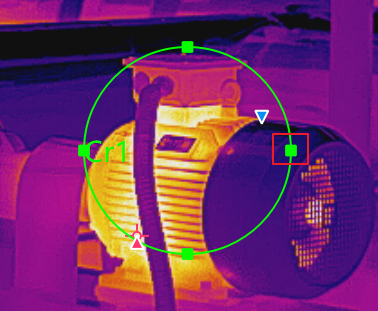
Figure 1 Resizing a Measurement
Tool
Edit Delta Calculation
In the Measurement Value window, you can right click a delta and select Edit to edit the delta.
Go to > Add Measured Temp. to open the Measurement Value window.
Modify Content and Style of Measurement Tool Overlay
The client supports adjusting the tool color, position and size of overlaid texts, making it easier to highlight the key content. See Set Overlays for instructions.
Share
Was this page helpful?
On This Page