View and Modify Image Annotations
Image annotations are various text, tags, voice and other additional information attached to the thermal image on the thermal image. In Analysis tab, you can view and modify some of the information.
In Analysis tab, select a file in the task list, and open annotations through on the right side of the window.
 on the right side of the window.
|
Annotations Type |
Descriptions |
|---|---|
|
Color Tag |
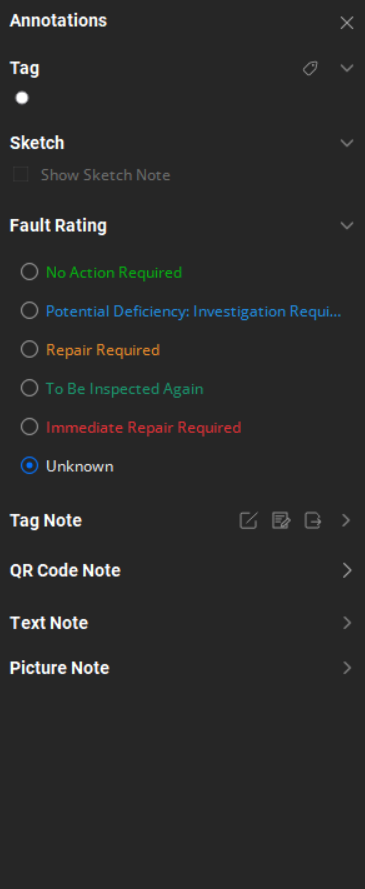
Tag is the color annotation added when the file is managed in My Favorites. During file analysis, modifications through is supported. For information about how to add tags, refer to Add Color Tag to File. |
|
Sketch Note |
During image capture, graphics annotated on the device via freehand sketching are termed Sketch Notes. Check the Show Sketch Notes to display the sketch layer. If a thermal image has no sketch attached, the option is grayed out. |
|
Text Note |
Text note is the text that the user adds to the image. View and edit in the text box under Text Note. Note
Saved text note are automatically read by the text note object in the report. |
|
Voice Note |
Voice note is the voice content that the user adds to the image. If an image has a voice note displayed in theText Note, click to play voice content. Note
If an image does not contain this content, the relevant button is not displayed. |
|
Tag Note |
When you need to quickly add standardized text content to multiple images, you can use tag note. The analysis report can link tag notes of images. Before using tag note, you need to create a tag note template. If an image has tag note information, you can modify it during analysis. You can save tag notes on an image as a template. The client supports batch application of tag note templates to all thermal images in task list. Tag notes of images in task list can be modified by batch. For information about how to create and manage tag note, refer toCreate and Use Tag Note Template. For information about how to add and modify image tag note, refer toSet Tag Note. |
|
Fault Rating |
Fault rating is the content added when the device takes pictures of the inspected objects during inspection. It can be modified during analysis. When an analysis report is generated, the fault rating is displayed in the overview page. |
|
Picture Note |
Picture note is images taken with the visual lens of device during thermal image capture. If a thermal image has such picture notes, they can be viewed in Picture Note. Click Larger Image in the lower right corner to enlarge the image. |
|
QR Code Note |
The QR code note is specific information of the observed target. It is added manually or by scanning QR code when the image was taken by the device. |
 is supported.
 to play voice
content.