Set Isotherm
Isotherm is a palette mode which assigns differentiated colors to specific temperature ranges for quickly identifying abnormal or special temperature areas in the image. Up to three isotherm temperature segments can be set, each with either solid color or palette filling.
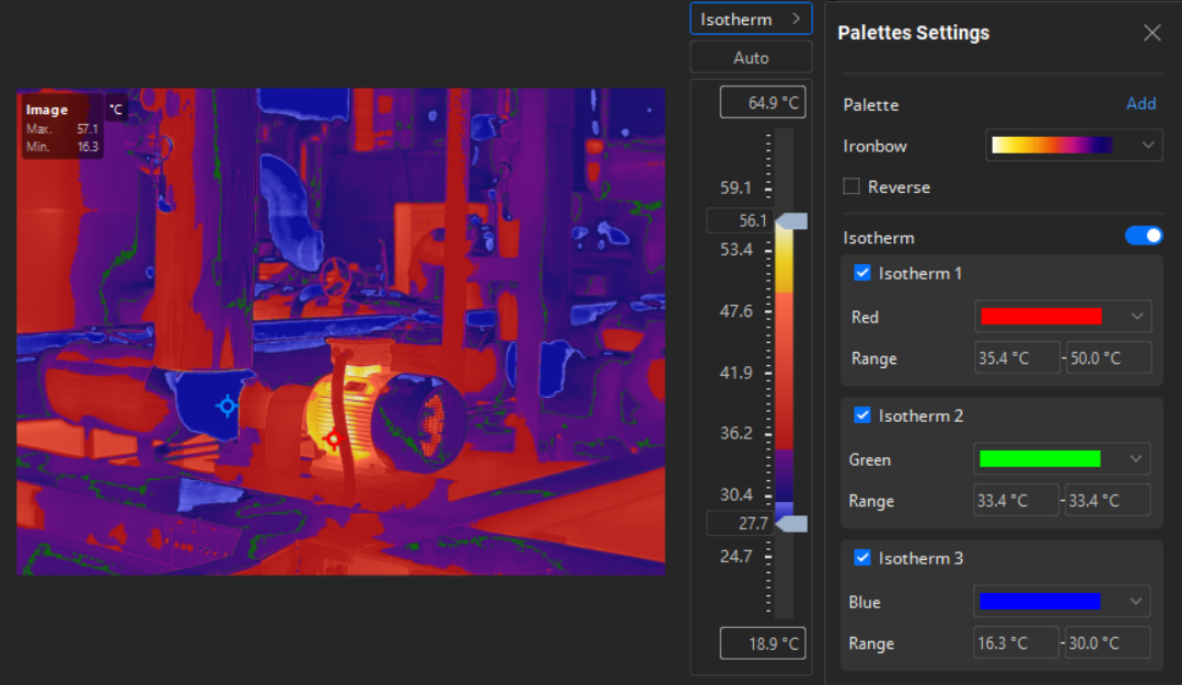
On the right side of the thermal imaging image, open the Palette Settings page and enable Isotherm. Three isotherms segments will appear on the settings page.
Check the required number of isotherms and set the Color and Range for each isotherm segment.
-
The color of each isotherm segment can be set as a solid color or palette fill.
-
Temperature ranges of isotherms can overlap. When overlapping occurs, the priority order for effective isotherm segments is: Isotherm 3 > Isotherm 2 > Isotherm 1